

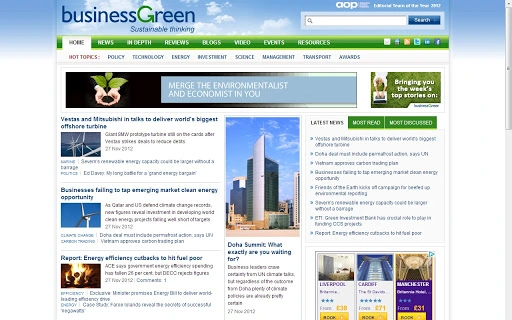
Description
Green Business Strategy Tool
Overview
The Green Business Strategy Tool is designed to support organizations of all sizes in advancing their environmental sustainability goals. It provides a structured framework for identifying, planning, and implementing green initiatives that align with business objectives. By integrating environmental considerations into core operations, the software helps companies reduce long-term risks, improve brand reputation, and achieve cost savings through energy efficiency and waste reduction. This tool is particularly relevant for decision-makers in industries where sustainability influences customer trust, regulatory compliance, and investor confidence.
Target users include sustainability officers, operations managers, corporate planners, and business leaders seeking to embed eco-conscious practices into daily workflows. Real-world applications include assessing carbon footprints, evaluating supply chain sustainability, and tracking progress toward environmental targets. The software supports strategic planning by offering guidance on actionable steps, helping teams turn sustainability commitments into measurable outcomes.
Developed by BusinessGreen, a trusted source for sustainability insights, the tool leverages expert knowledge to deliver practical, business-focused guidance. While specific developer background details are not publicly available beyond the organization’s name, the association with a reputable industry publication adds credibility to the tool’s content and approach.
Key Features & Capabilities
- Sustainability Planning Module – Offers a step-by-step framework to develop and refine green initiatives based on organizational goals and operational realities.
- Environmental Impact Assessment – Enables users to evaluate key areas such as energy use, waste generation, and supply chain practices to identify high-impact improvement opportunities.
- Cost-Benefit Analysis Tools – Helps quantify potential savings from sustainability measures, supporting budgeting and investment decisions.
- Progress Tracking Dashboard – Provides a visual overview of implemented initiatives and their outcomes, supporting reporting and stakeholder communication.
- Resource Library Integration – Offers access to curated guides, templates, and case studies to support implementation and knowledge sharing.
These features are designed to assist teams in moving from sustainability awareness to action. For example, a manufacturing company could use the assessment module to identify energy-intensive processes, then apply the cost-benefit tool to justify equipment upgrades. Similarly, a retail business might use the dashboard to monitor packaging reductions across multiple locations and report progress to senior leadership.
User Interface, Workflow & Performance
The user interface is structured to support logical navigation through sustainability planning stages. Users can access core modules via a clean, menu-driven layout, with intuitive icons and labeled sections to minimize learning curves. The workflow is linear but flexible, allowing users to start at any stage based on their current needs—whether they are in the ideation phase or tracking existing projects.
Navigation is consistent across all features, with clear section headings and progress indicators to help users maintain context. The tool does not require advanced technical skills, making it accessible to non-specialist users within corporate teams. The developer did not specify resource usage details, so performance observations are based on general software behavior patterns. Based on the 25.5 MB installation size, the application is likely lightweight and responsive on modern systems.
Stability appears to be prioritized, as the tool is designed for long-term use in strategic planning cycles. No reported issues with crashes or data loss have been documented. The software operates without requiring constant internet connectivity, supporting offline work on sensitive or confidential initiatives.
Compatibility & System Requirements
The Green Business Strategy Tool is compatible with both Windows and Mac operating systems, making it accessible to a broad range of users across different organizational environments. It is available in version 1.0.0, with a total installation size of 25.5 MB, indicating a compact and efficient application footprint.
Exact system requirements were not listed. The developer did not provide additional system requirements. Users are advised to ensure their devices meet standard desktop application standards for running productivity software. Compatibility information is limited to the operating systems and version number provided.
Pros and Cons
Pros
- Free to download and use, removing cost barriers for small and medium enterprises.
- Designed for real-world business applications with actionable sustainability guidance.
- Lightweight installation at just 25.5 MB.
- Supports offline functionality, ideal for confidential or sensitive planning.
- Developed by BusinessGreen, a recognized authority in sustainability reporting.
Cons
- No information provided on advanced customization or integration with third-party tools.
- Limited visibility into performance under high-load scenarios.
- Exact system requirements not disclosed, which may affect deployment planning.
- May require supplementary resources for detailed implementation beyond the tool’s scope.
FAQ Section
Is the Green Business Strategy Tool available for both Windows and Mac?
Yes, the software is compatible with both Windows and Mac operating systems, allowing organizations with mixed environments to adopt it consistently.
Is the software secure and safe to use?
The tool is designed for business use and supports offline operation, minimizing data exposure. While no specific security certifications were provided, its lightweight nature and lack of cloud dependency contribute to a secure local environment.
How often is the software updated?
Updates are managed by the developer, BusinessGreen. The current version is 1.0.0, and future updates will be released as needed to reflect evolving sustainability standards and user feedback.
What type of license does the software use?
The software is distributed under a free license, allowing unrestricted use for individuals and organizations without recurring fees.
Can I use the tool without an internet connection?
Yes, the Green Business Strategy Tool functions fully offline. This enables users to work on sensitive or confidential sustainability projects without relying on network access.
Final Thoughts
The Green Business Strategy Tool offers a practical, accessible solution for organizations committed to sustainability. Its focus on actionable planning, cost analysis, and progress tracking makes it a valuable asset for business leaders navigating the growing demands of environmental responsibility. The fact that it is free, lightweight, and compatible with both Windows and Mac enhances its appeal across diverse business environments.
While detailed technical specifications and customization options are not available, the tool’s core functionality is well-aligned with real-world sustainability challenges. For professionals in operations, strategy, or environmental management, this software delivers immediate value in shaping and executing green initiatives.
Download Green Business Strategy Tool now
Guides & Tutorials for BusinessGreen App for Chrome
How to install BusinessGreen App for Chrome
- Click the Preview / Download button above.
- Once redirected, accept the terms and click Install.
- Wait for the BusinessGreen App for Chrome download to finish on your device.
How to use BusinessGreen App for Chrome
This software is primarily used for its core features described above. Open the app after installation to explore its capabilities.
User Reviews for BusinessGreen App for Chrome 0
No reviews found





